Use cases
Too many tabs open: turn them into a library
Drag research tabs from the open tabs panel into a workspace or category in Nisaba, then come back to them later.
To turn a pile of research tabs into something you can come back to, drag them from the open tabs panel in Nisaba onto a workspace, a category or your Inbox. Each tab you drag is saved. This needs the Nisaba extension for Chrome.
Show your tabs next to your library
With the Nisaba extension, your open tabs appear beside your library in the web app. The panel sits beside the library from 1280 px wide. Below 1280 px the same list opens from the top bar. Open tabs sync is optional and off until you turn it on. Incognito windows and browser pages such as chrome:// are never sent.
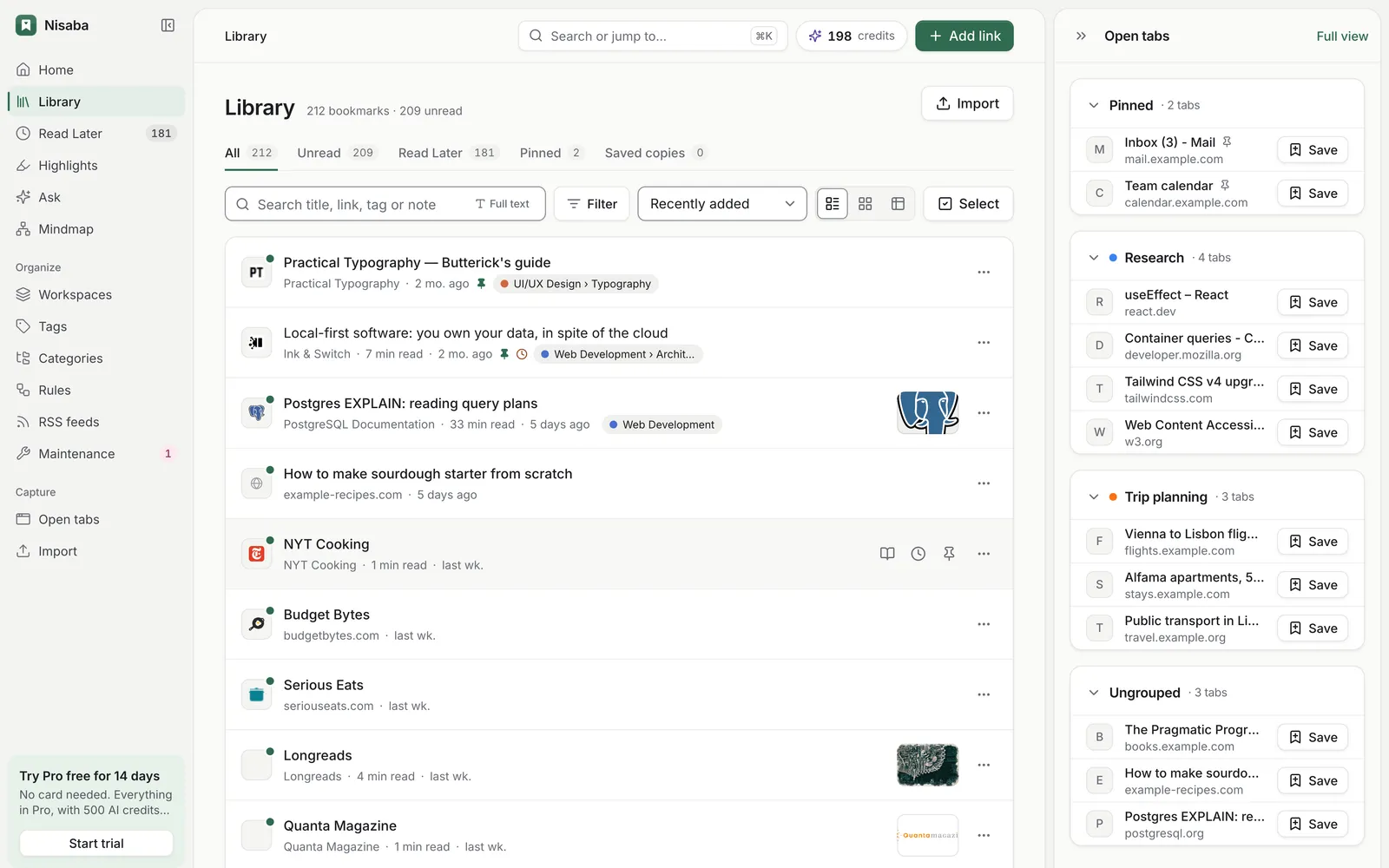
Drag tabs to where they belong
- Turn on Sync open tabs in the extension's Settings.
- Open the web app. Your tabs appear in the open tabs panel.
- Drag a tab onto Inbox, a category or a workspace.
- Repeat for each tab worth keeping.
An example: one talk, twenty tabs
You open twenty tabs while you prepare a talk on local-first software. Create a workspace named Talk. Drag the tabs you want onto it. Drag the doubtful ones onto Inbox and decide later. Next week you open the workspace and find the sources in one list.
One workspace per project
A workspace groups bookmarks for one project or topic, with its own sections and saved views. Nothing moves out of your library. A second project gets a second workspace, so the tabs for each project stay apart.
Sort the rest later
Saves in your Inbox can wait. On the Categories page, or from a selection in the library, you can recategorize many saves at once, with an optional instruction. Only the category and subcategory change. Summaries and tags stay. AI credits are charged for what is actually processed.
AI proposes a category and tags for each save. You can edit or remove every suggestion. AI output can be incomplete or wrong.
Limits
- The extension is for Chrome only and needs Chrome 120 or newer.
- Free allows 3 workspaces besides your Inbox. Pro has no limit on workspaces, within the fair-use caps listed in the terms.
- Nisaba needs an internet connection.
- There is no native mobile app yet. The web app can be installed as an app.
Last updated: