Move to Nisaba
Import X likes and bookmarks into Nisaba
Upload data/like.js from your X archive, or a JSON bookmark export. No passwords, no scraping and no sync.
To bring your X likes into Nisaba, download the archive of your data from X and upload data/like.js as it is. X bookmarks need a third-party exporter that produces JSON with the post links or ids. Nisaba never asks for your social passwords, does not scrape accounts and does not sync with X.
Import your likes
- Download the archive of your data that X lets you download.
- Find data/like.js in the archive. Upload it as it is.
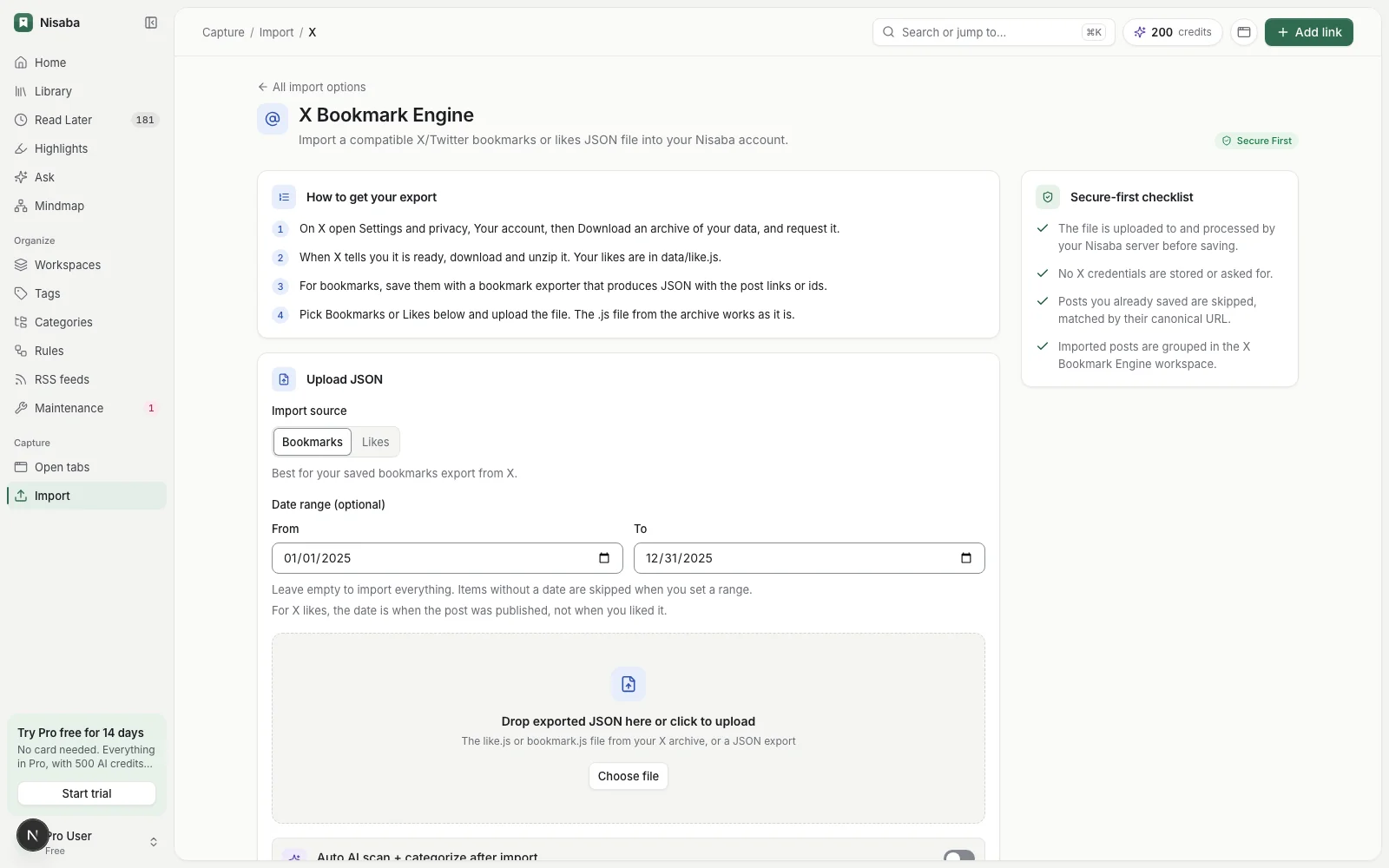
- In Nisaba, choose Import. Under Or from a social network, pick X.
- Choose Likes. If you want only part of the file, set From and To under Date range.
- Upload the file.
What the file holds
| In like.js | In Nisaba |
|---|---|
| Post id | Kept |
| Post text | Kept |
| Post link | Kept |
| Date | Read from the post id: the day the post was published |
| Author | The file has none, so it shows as unknown |
The table comes from a test on 1 November 2026 with sample files. It is not a test on a real account.
Note: The date is when the post was published, not when you liked it. A date range from 1 January to 31 December 2025 picks posts published in 2025. Items without a date are skipped when you set a range.
Import your bookmarks
Your X bookmarks are not in the data archive. Use a bookmark exporter that produces JSON with the post links or ids, then choose Bookmarks on the X import page and upload that JSON. Check what an exporter asks of you before you use it. Nisaba needs only the file.
What happens on import
- Social imports have no preview step.
- Posts you already saved are skipped, matched by their canonical URL. Importing the same export twice adds nothing.
- Imported posts are grouped in a workspace of their own, for example X Bookmark Engine. If you have reached the workspace limit on Free, they go to Inbox instead.
- Files can hold up to 50 MB and 100,000 items.
Turn on Auto AI scan + categorize after import if you want the imported posts categorized with AI. This uses AI credits. AI output can be incomplete or wrong, so check the categories and change them where needed.
Limits
- Nisaba reads only the file you upload. It does not follow your X account.
- Likes show the author as unknown.
- Nisaba needs an internet connection, and there is no native mobile app yet.
Last updated: