Compare
Nisaba vs Toby: saved tabs and bookmarks compared
Compare Nisaba and Toby on saved tabs, organizing, search, price and export, with notes on who each tool suits.
Toby suits you if your main need is saving tab sessions in collections and spaces, alone or on a team plan. Nisaba suits you if you also want a searchable reading library with highlights and answers written from your saves. Nisaba's open tabs panel needs the Chrome extension and an internet connection.
Facts side by side
| Topic | Nisaba | Toby |
|---|---|---|
| Platforms | Web app for desktop and phone browsers, installable as an app; Chrome extension | Chrome extension, web app, App Store and Google Play apps |
| Saved tabs | Open tabs panel beside the library; drag a tab onto Inbox, a category or a workspace | Starter: up to 60 saved tabs. Productivity: unlimited saved tabs |
| Organizing | Workspaces, categories, tags and rules. Free: 3 workspaces besides Inbox | Collections, spaces, save session, tags, notes and share collection |
| Search | Keyword search; Find searches by meaning and uses AI credits | Starter: basic search. Productivity: advanced search of history |
| Price | Free: €0, no time limit. Pro: €6.99 a month or €59 a year | Starter free. Productivity $6 per member a month or $54 a year. Team $10 per member a month or $96 a year, adds SSO, priority support and central billing |
| Export | ZIP, HTML, JSON or CSV, free on every plan | JSON, HTML or TXT, per collection or per workspace |
Checked on 1 November 2026 on gettoby.com/pricing and help.gettoby.com.
Note: With a billing country in the EU these are final prices, as FluxonLab currently charges no VAT; outside the EU, Link (by Stripe) sells Pro as merchant of record and may add local taxes at checkout.
Saving a trip's tabs
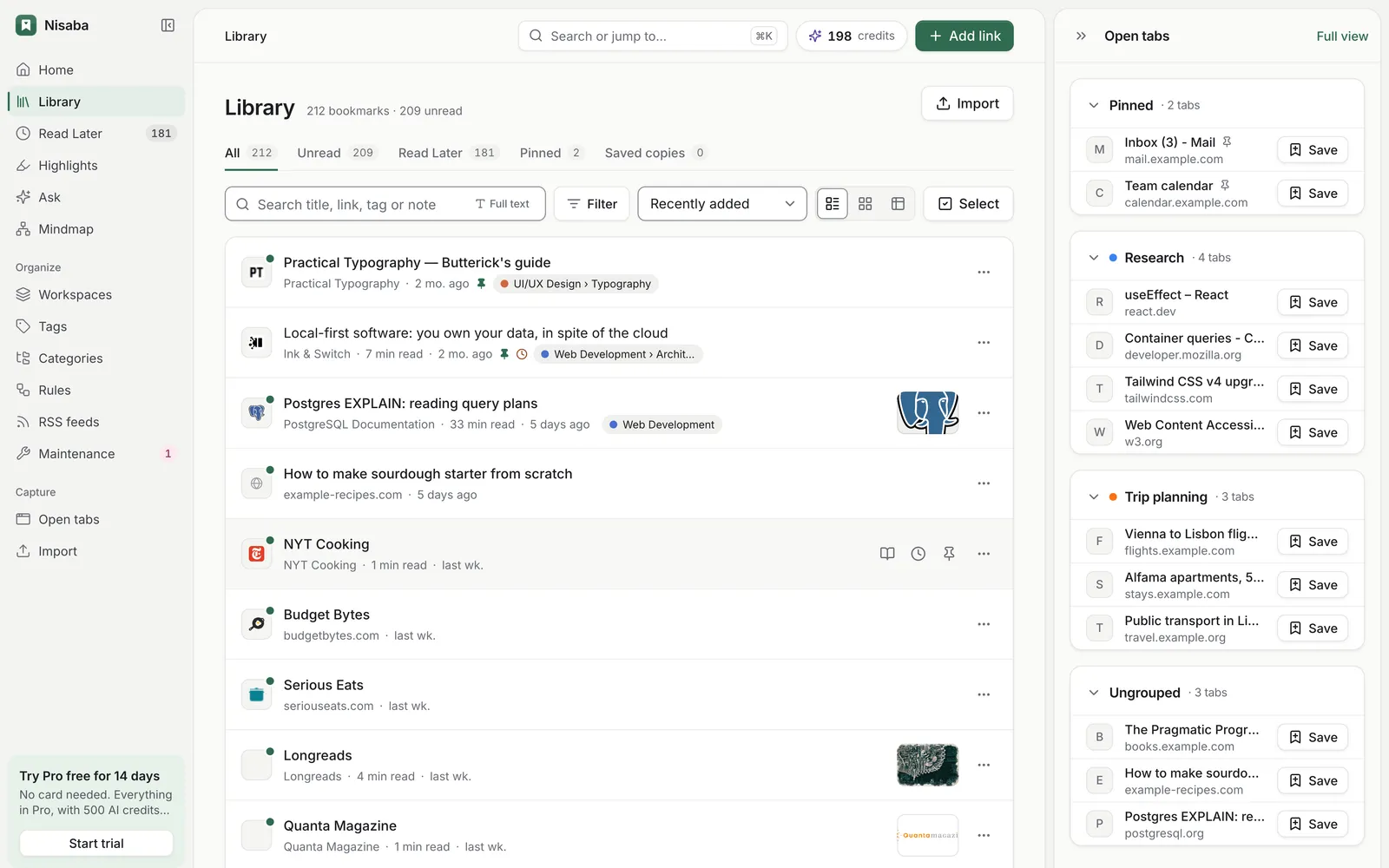
Say you have 25 tabs open for a trip. With the extension installed and open tabs sync turned on, your tabs appear beside your library in the web app from 1280 px wide. Drag a tab onto a workspace named Trip and it is saved. Below 1280 px, the same list opens from the top bar. Sync is optional and off until you turn it on.
Moving over
Nisaba imports Toby's JSON export. Export JSON in Toby, because it is the only Toby format that keeps notes and labels. In Nisaba, choose Import, pick Browser and upload the file. You see a preview before anything is saved. Collections become folders, custom titles and descriptions come over as titles and notes, and labels become tags. The file holds no save dates, and note cards are skipped because they have no link. In a test on 1 November 2026 with real Toby JSON exports, all 85 links came over. You can also drag open tabs from the panel into a workspace, or bring in your Chrome bookmarks from the extension, version 2.1 or later, which sends only the folders you pick.
Nisaba's limits
- The extension is for Chrome only. There is no native mobile app yet.
- Nisaba needs an internet connection.
- Free shows open-tab history from the last 30 days, and every plan keeps the latest 1,000 snapshots.
- Free has 3 workspaces besides Inbox and 3 automation rules. Pro has no limit on workspaces or automation rules.
- Find uses AI credits. AI output can be incomplete or wrong.
Last updated: