Use cases
Save open tabs in Chrome and restore them
Turn on open tabs sync in the Nisaba extension, choose which tabs to send, save one tab or keep a snapshot, and restore earlier versions.
To save your open tabs in Chrome, open the Nisaba extension's Settings, go to Open tabs and turn on Sync open tabs. Then choose which tabs to send. Nisaba keeps your open tabs as a saved session, and you can go back to earlier versions of it.
Turn on sync
- Open the extension's Settings and go to Open tabs.
- Turn on Sync open tabs.
- Choose which tabs: Current window, Selected tabs in this window or All normal windows.
- Press Save changes.
- Allow tab access when Chrome asks.
- Open Nisaba and find your tabs under Open tabs.
Sync is off until you turn it on. The extension sends the title, address, icon, group and pinned state of normal tabs, which tab is active, and this device's name. Incognito windows and browser pages such as chrome:// are never sent.
Save one tab
- Open the page and click the Nisaba icon in the toolbar.
- To add tags or pick a workspace, open Tags and workspace first.
- Choose Save to Nisaba, or Later to put the page in Read Later.
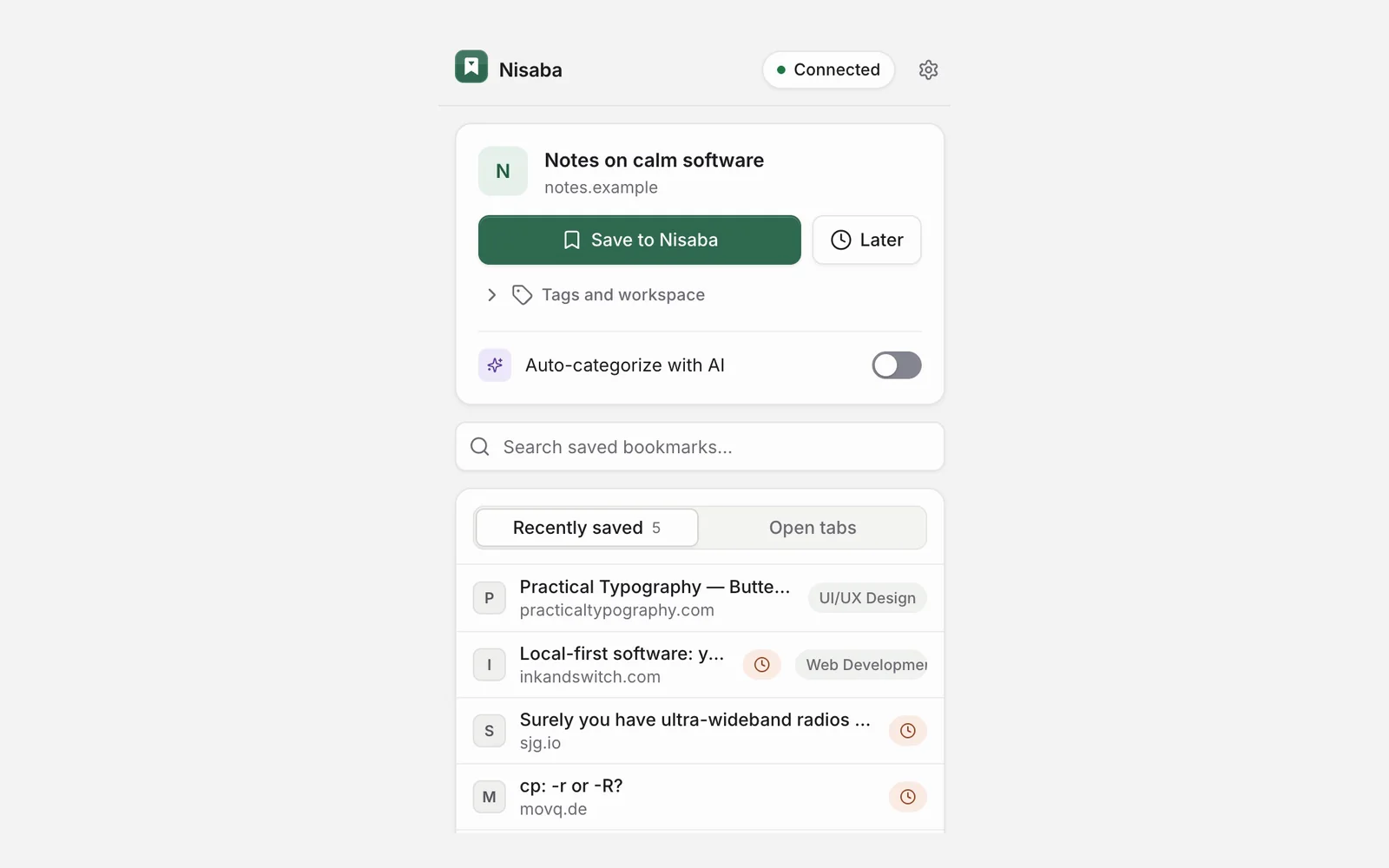
Alt+Shift+S saves the page you are on. In the web app you can also drag one tab from the open tabs panel onto Inbox, a category or a workspace. Inside a workspace you can snapshot your open tabs.
Go back to earlier versions
Earlier versions of your open tabs stay in Nisaba, and you restore from that history on the Open tabs page. The plan decides how much of the history you see.
| Plan | History you see | Snapshots kept |
|---|---|---|
| Free | The last 30 days | The latest 1,000 |
| Pro | All kept snapshots | The latest 1,000 |
Every plan keeps the latest 1,000 snapshots and deletes the oldest above that. While your tabs keep changing, a device starts a new snapshot about every 5 minutes, so 1,000 can fill in a few days. Snapshots older than 30 days stay stored while they are within the latest 1,000, and they show again with Pro.
Turn sync off
If you turn sync off, the extension removes tab access and deletes the live snapshot. Earlier versions stay in Nisaba until you delete them on the Open tabs page.
Limits
- The extension is for Chrome only and needs Chrome 120 or newer.
- Nisaba needs an internet connection. If the connection drops, a one-click save waits in a local queue and retries.
- There is no native mobile app yet.
- The history keeps at most 1,000 snapshots on every plan.
Last updated: